README 目錄
dynamic-form-kit-react (動態表單套件-react)
此專案僅用於展示。
如果需要實際應用的表單套件,請考慮持續發展的全面的表單套件作為表單元件庫,並且使用其他動態表單套件。
網站: dynamic-form-kit-react
概述
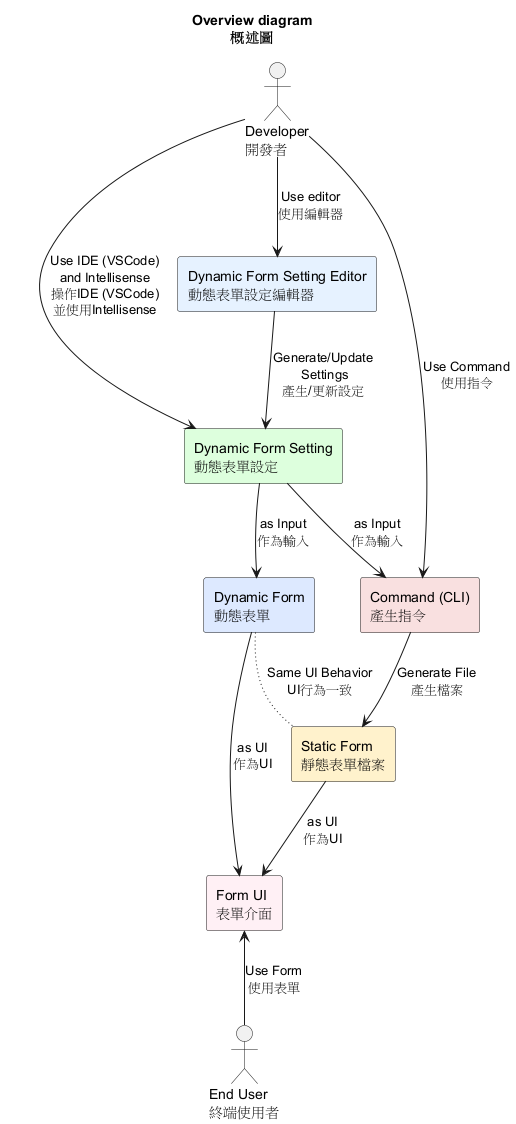
這是快速產生表單UI的React套件,使用typescript。
- 透過
Dynamic Form Setting(動態表單設定)產生Dynamic Form(動態表單),在IDE(VSCode)編輯時支援Intellisense。 - 透過指令產生
Static Form(靜態表單)檔案,其UI行為和Dynamic Form(動態表單)一致,並解除套件依賴。 - 透過
Dynamic Form Setting Editor(動態表單設定編輯器)產生Dynamic Form Setting(動態表單設定)。
概述圖:
語意列表
一般
| 語意 | 說明 |
|---|---|
Dynamic Form(動態表單) | 透過設定動態產生的表單元件的表單UI |
Static Form(靜態表單) | 表單元件是固定的, 而不是透過設定動態產生 |
Dynamic Form Setting(動態表單設定) | 設定動態表單, 包含設定各個資料欄位使用的表單元件及相關參數 |
套件元件
| 語意 | 說明 |
|---|---|
Dynamic Form Component Setting(動態表單元件設定) | 對於表單欄位設定表單元件 |
Dynamic Form Validator Setting(動態表單驗證器設定) | 對於表單欄位設定驗證器 |
Dynamic Form Builder(動態表單建造器) | 透過設定動態使用表單元件並產生表單UI的元件 |
Form Component Library(表單元件庫) | 一組表單元件的集中入口 |
套件使用者介面
| 語意 | 說明 |
|---|---|
Static Form Generator Commands(靜態表單產生器指令集) | 用於產生靜態表單的指令集 |
Dynamic Form Setting Editor(動態表單設定編輯器) | 編輯動態表單設定的UI |
Dynamic Form Setting Template(動態表單設定範本) | 對於動態表單設定的欄位設定的預設設定集合, 在編輯器中使用 |
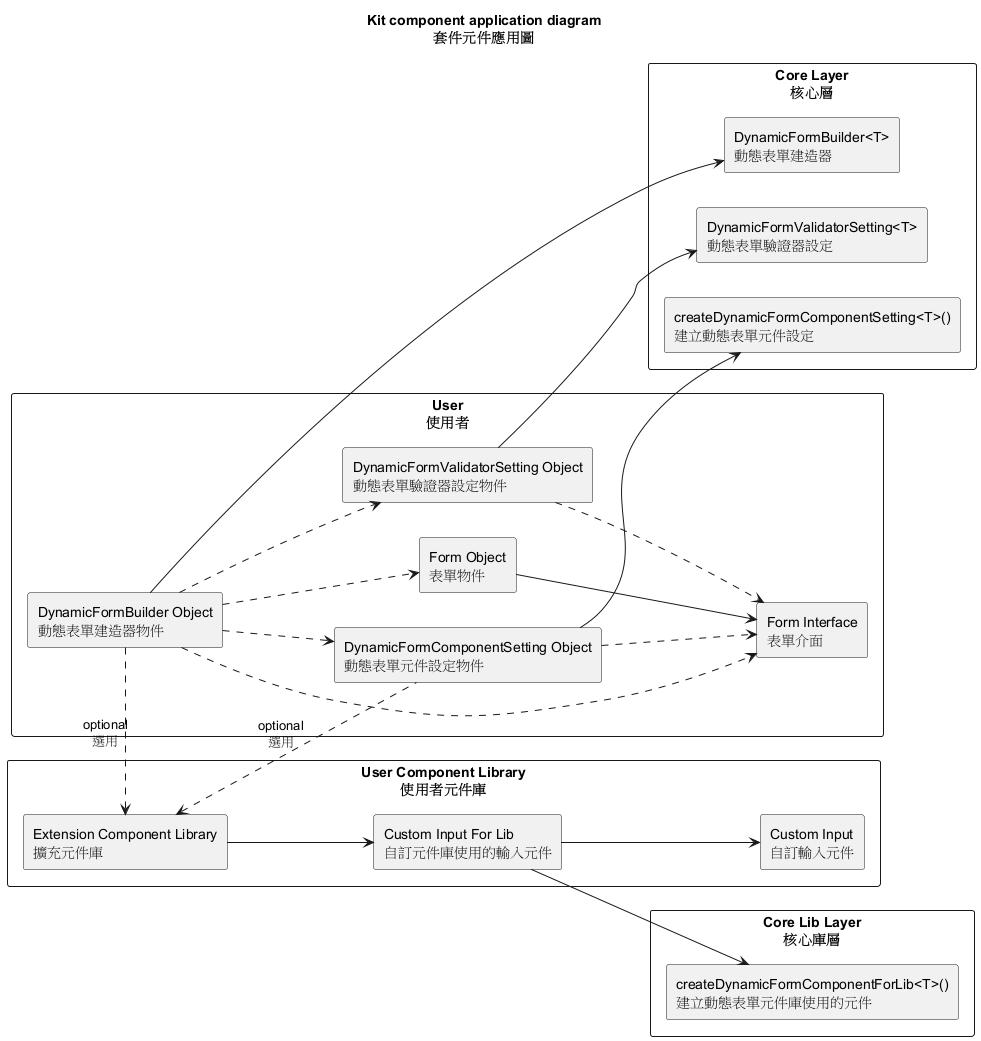
套件架構
套件應用圖:
Dynamic Form Component Setting(動態表單元件設定):
語法說明
export const #objectName# = createDynamicFormComponentSetting<
  #FormInterface#,
  #ComponentLibraryObject(optional)#
>()((d) => ({
  #fieldSettings(optional)#
}));
#fieldSettings(optional)#設定語法
每個欄位使用以下語法:
"#fieldName#": d({
  componentName: #componentName#,
  componentProps: #componentProps#
}),
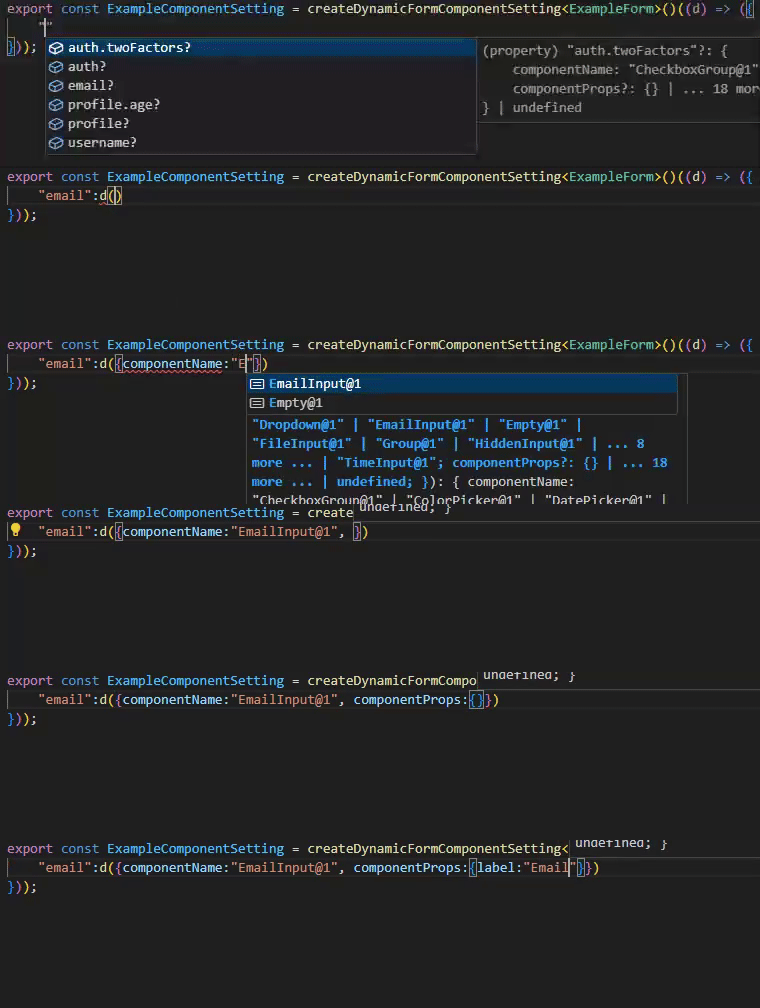
以下支援 IntelliSense 自動提示:
#fieldName##componentName##componentProps#:元件屬性設定
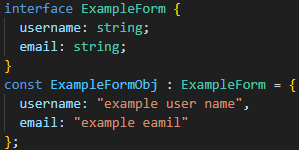
自訂表單資料範例:
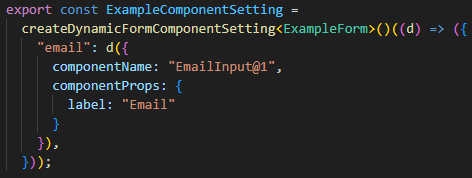
設定範例:
使用VS Code IntelliSense範例:
Dynamic Form Validator Setting(動態表單驗證器設定):
語法說明
const #objectName#: DynamicFormValidatorSetting<#FormInterface#> = {
  #fieldSettings(optional)#
};
#fieldSettings(optional)#設定語法
每個欄位使用以下語法:
"#fieldName#": {
  validator: (fieldValue, parentObject, fieldKey, form) => {
    // 驗證邏輯 ...
    return {
      isError: boolean,
      message: string
    };
  },
  validGroupId?: string   //驗證群組 ID(選填)
}
若多個欄位擁有相同的
validGroupId,當其中任一欄位觸發驗證時,該群組內所有欄位會同步執行驗證。
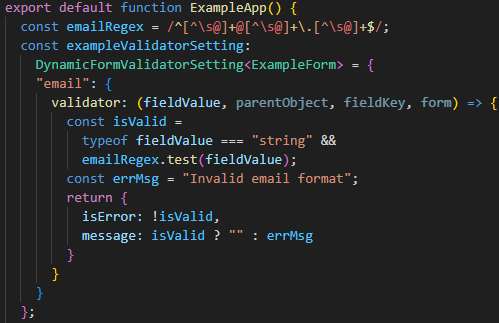
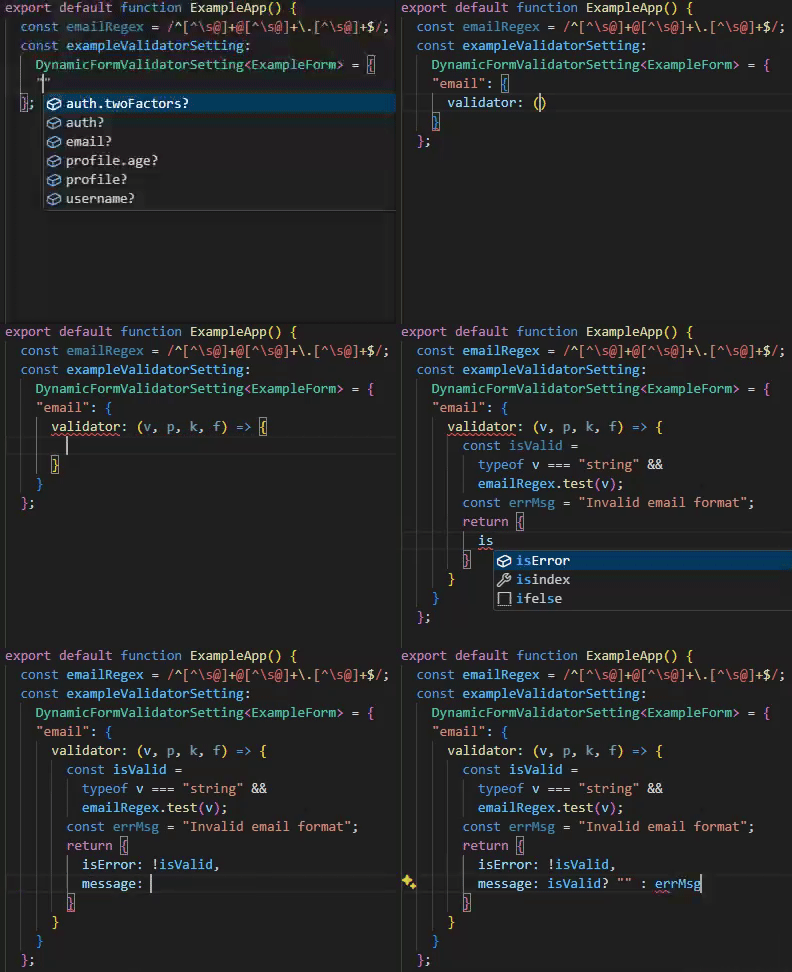
以下支援 IntelliSense 自動提示:
#fieldName#
設定範例:
使用VS Code IntelliSense範例:
Dynamic Form Builder(動態表單建造器):
語法說明
const #objectName# = <DynamicFormBuilder<#FormInterface#>
  formData={...}
  onChange={...}
  componentSetting={...}
  validatorSetting={...}
  actionButtons={...}         // 選填:提交、重置等動作按鈕設定
  componentLibrary={...}      // 選填:自訂元件庫
/>
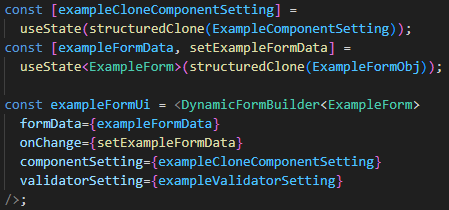
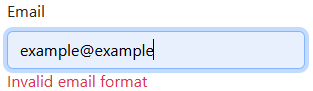
簡易範例:
簡易範例介面:

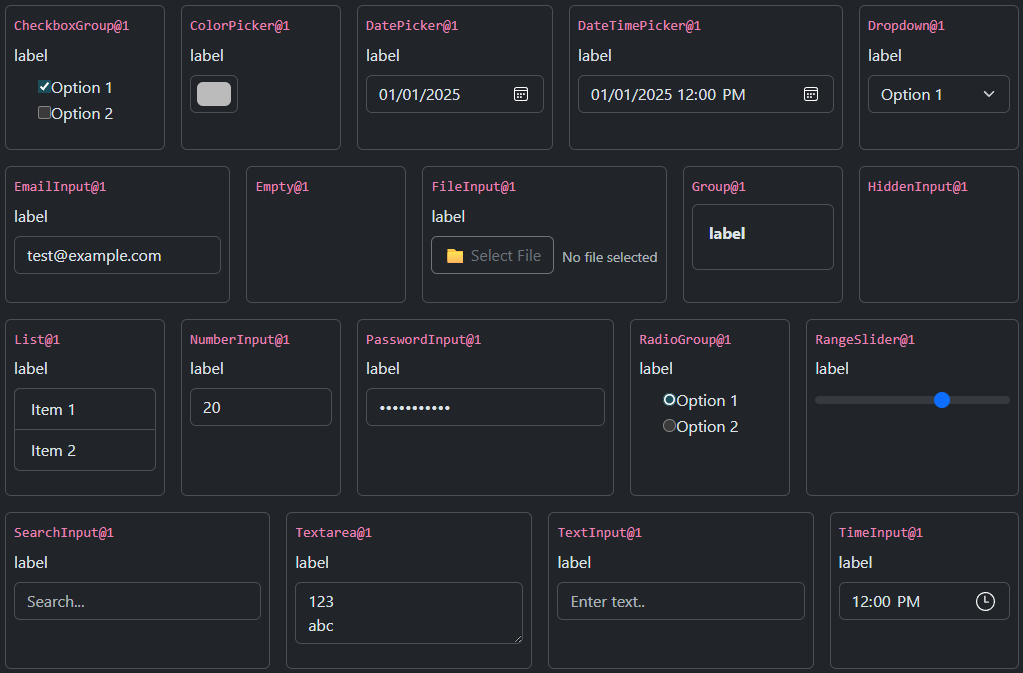
Form Component Library(表單元件庫):
一組表單元件的集中入口.
內建表單元件庫.
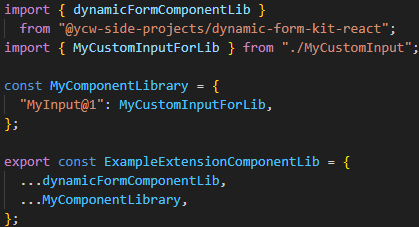
自訂擴充表單元件庫
語法說明
const #objectName# = {
  #customComponentName#: #componentDefinition#,
  // ...more components
}
#objectName#: 自訂擴充表單元件庫名稱#customComponentName#: 作為此元件在整個自訂擴充表單元件庫中的唯一識別 ID, 在Dynamic Form Component Setting中使用
範例:
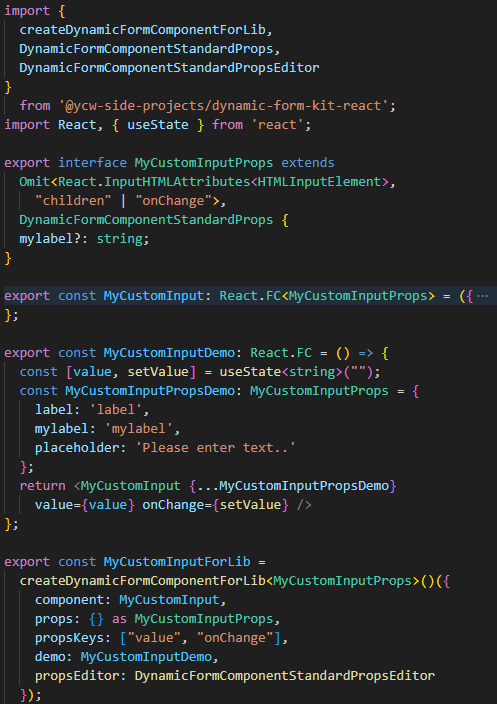
自訂表單元件
語法
export const #objectName# = createDynamicFormComponentForLib<#CustomComponentProps#>()({
  component: #CustomComponent#,
  props: {} as #CustomComponentProps#,
  propsKeys: #keys for generator#,
  demo: #DemoComponent#,
  propsEditor: #PropsEditorComponent#,   // 選填
  icon: #icon#   // 選填
})
| 欄位名稱 | 用途 | 必要 |
|---|---|---|
component | 實際用於渲染的 React 元件 | 是 |
props | 元件 Props 型別,用於 IntelliSense | 是 |
propsKeys | 用於Static Form生成的關鍵 props(如 value, onChange, validation) | 是 |
demo | 在 Dynamic Form Setting Editor中顯示的Demo元件 | 是 |
propsEditor | 自訂屬性編輯器,用於Dynamic Form Setting Editor中設定此元件的 Props | 選擇 |
icon | 自訂圖標,用於Dynamic Form Setting Editor顯示 | 選擇 |
propsEditor規格: 使用DynamicFormComponentStandardPropsEditor或DynamicFormComponentDynamicPropsTextEditor或是符合其型別的自訂React元件.
範例:
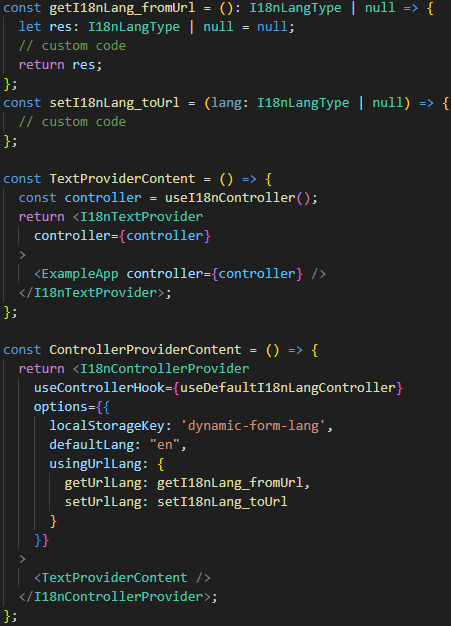
多語系:
語法
const getI18nLang_fromUrl = (): I18nLangType | null => { /* return I18nLangType|null */ };
const setI18nLang_toUrl = (lang: I18nLangType | null) => { /* custom code */ };

const TextProviderContent = () => {
  const controller = useI18nController();
  return <I18nTextProvider controller={controller}>
    <#App# controller={controller} />
  </I18nTextProvider>;
};

const ControllerProviderContent = () => {
  return <I18nControllerProvider
    useControllerHook={useDefaultI18nLangController}// 可替換成自訂的 useControllerHook
    options={{
      localStorageKey: '#custom key#',
      defaultLang: "en", // 自訂
      usingUrlLang: { getUrlLang: getI18nLang_fromUrl, setUrlLang: setI18nLang_toUrl } // 選用
    }}
  >
    <TextProviderContent />
  </I18nControllerProvider>;
};
| 區塊 | 說明用途 |
|---|---|
getI18nLang_fromUrl / setI18nLang_toUrl | 自訂從 URL 讀取或寫入語系,用於網址同步語言。 |
<I18nControllerProvider> | 建立全域 I18n 控制器(包含語系狀態、localStorage、URL 同步)。 |
useControllerHook | 指定使用的語系控制 Hook。 |
options.localStorageKey | 多語設定記錄在 localStorage的Key。 |
options.defaultLang | 預設語言, 使用I18nLangType的類型(e.g. "en")。 |
options.usingUrlLang | 可選,用於啟用網址語言同步機制。 |
<I18nTextProvider> | 提供實際文字對應 (字典查找))。 |
controller | 語系控制器,必須給I18nTextProvider, Dynamic Form Setting Editor, Static Form。 |
useControllerHook: 有預設的useDefaultI18nLangController可以使用.
範例:
Dynamic Form Setting Editor(動態表單設定編輯器):
使用編輯器:
使用<DynamicFormHome #componentLibMap(optional)# />使用編輯器.
#componentLibMap#為符合Map<string, ComponentLibForEditor>格式的物件. 使用getDefaultMapComponentLibForEditor()取得包含預設lib的libMap.
語法
const #objectName# = <DynamicFormHome
  componentLibMap={#Component Library Map#}
  langController={#II18nLangController#}
/>
#Component Library Map#: 為string對應到Form Component Library的Map物件#II18nLangController#: 為II18nLangController物件
範例:

Dynamic Form Setting Editor的UI說明:
- 在UI中查看
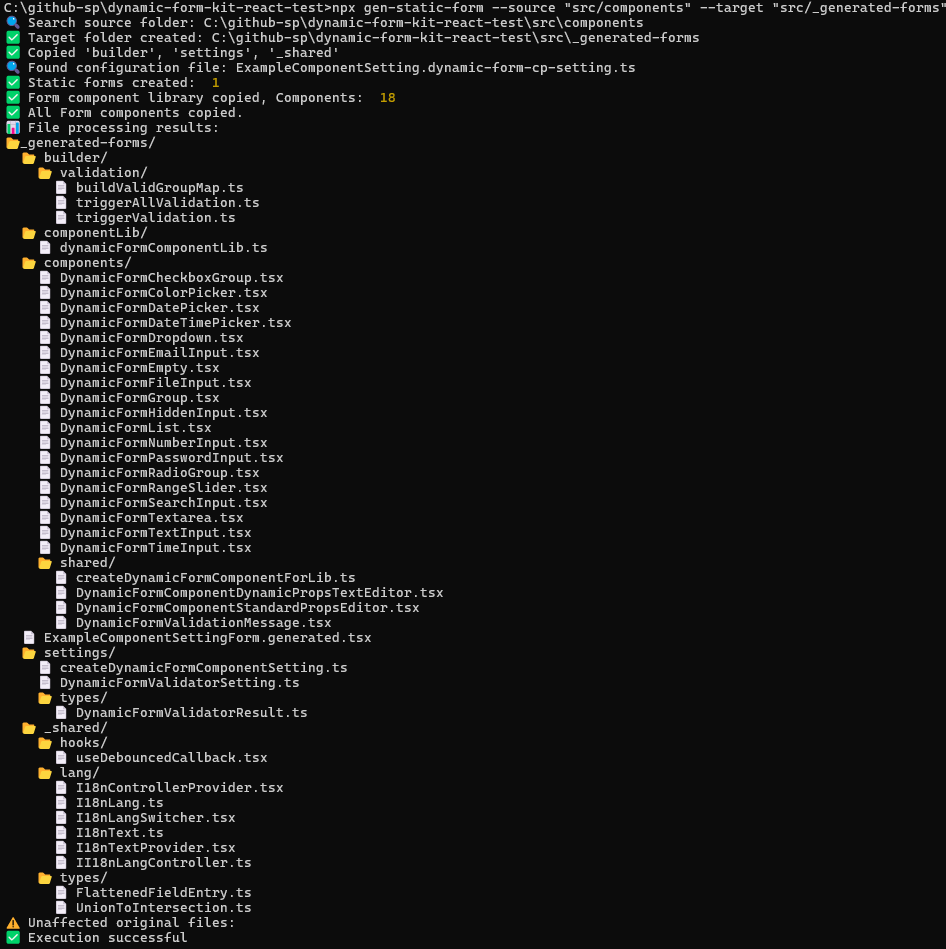
Static Form Generator Commands(靜態表單產生器指令集):
產生靜態表單指令:
npx gen-static-form --source "#source dir#" --target "#target dir#"
"#source dir#"是Dynamic Form Component Setting的來源的頂部資料夾."#target dir#"是產生Static Form的目標資料夾, 會覆寫, 不會刪除.
範例:
附註
- IDE使用
VS Code,其餘IDE未確認。
表單元件庫
表單元件庫
CheckboxGroup@1
label
ColorPicker@1
DatePicker@1
DateTimePicker@1
Dropdown@1
EmailInput@1
Empty@1
FileInput@1
未選擇檔案
Group@1
label
List@1
label
- 項目一
- 項目二
ListInput@1
NumberInput@1
PasswordInput@1
RadioGroup@1
label
RangeSlider@1
SearchInput@1
Textarea@1
TextInput@1
TimeInput@1
元件設定
表單元件庫:
範本
元件建議規則編輯器
類型
string類型
number類型
array類型
object表單資料
編輯表單Json物件
欄位設定
檔案設定
預覽
即時渲染表單
即時表單物件
預覽檔案
位置路徑: 元件設定 表單資料 編輯表單Json物件
元件設定
表單資料
編輯表單Json物件
編輯表單Json物件
(1) 編輯表單Json物件
(2) 編輯欄位設定
(3) 檢閱動態表單
(4) 編輯檔案設定並匯出